Wednesday, May 29, 2019

Linkage – A rare survey of technology ownership among the oldest

When there’s nothing else to buy. Funny about technology ownership among the oldest – generally there is no way to know whether they own any or if would they buy it. Neither Pew (in 2018) nor AARP (2019 technology ownership) broke out upper age ranges. So Link·age Connect is an outlier that asks ownership questions and documents age breakdowns of responders, half of whom were age 75+. This 2019 Technology Survey of Older Adults Age 55-100, conducted online, notes that 80% of respondents (45% of whom live in senior-oriented communities/housing) have smartphones. At this point, if the mobile phone breaks, what’s the store rep going to promote, and it doesn’t matter which store? While they carry flip/feature phones, an iPhone or an Android phone can be used just like a flip phone. More than 50% of respondents have smart TVs (yes, that’s nearly all you can buy these days).  

When there’s plenty of positives to say...  With grandchildren encouragement and media hype, unlike the 2016 Link·age survey, the responders were quite aware of the newer technologies on the market. But if they did not already own them, and even if they did, they were not interested in learning more about what’s new. The Internet, Family, Google and Friends are their trusted sources, and online training is the preferred method for learning about communications tech.  The comments (pages of them) captured perspectives in a way other research doesn't. Said an 80+ year old woman:  "It’s a very exciting field for me and I love using it in limited ways."  "Keeping up with the changes in computers keeps my mind expanding (or trying to)!" – said a woman, age 85+. And another, age 80+: "I would be lost without it." From a male, age 85+: "Car tech also helps with safety, Bluetooth, and back-up camera." And from a woman age 90+: "Glad I lived this long to enjoy it."

…And not so positive. Another woman, age 80+: "The biggest factor is how it is always changing, out-of-date the minute you buy it." Said another, same age: “When hacking is no longer an issue, I’ll be more interested." "I think technology is great, but how much do we need?" (Woman, age 85+).  And it’s "For my wife only” (Male, Age 90-94). "I think the beginning of it is hard and easier for young people to adapt to." (Female, Age 95+).  From a man, age 85+: "I need to know more. I walk into Best Buy and feel like a dummy!"  And from a woman aged 90+: "It is a challenge to older retired people." And the biggest understatement: "Some devices are unnecessarily complicated with inadequate documentation." (From a male, age 80-84). 

Five factors characterize what this older demographic expects.  The report also covers safety and security technology, smart home, as well as health and wellness usage. It summed up factors that are most important when designing products for the oldest demographics: Trust, Personal Contact, Frugality (regardless of income), Simplicity, and Education. Who could disagree? They do not want to "fumble", according to the report author, Link·Age’s Suzanne Viox.  Yet "fumble" is exactly the out-of-the-box experience we all have with new technology, making us feel incompetent, or at the very least, insecure.  Perhaps not surprisingly, 22% of the responders already own smart speakers. Maybe the out-of-the-box experience -- where the device says “Hello!” and suggests topics to ask about -- may have been startling, to say the least.  

[NOTE: If you are going to be at CALA in Monterey next week, or the Silicon Valley Boomer Venture Summit in Berkeley -- let's meet!]


from Tips For Aging In Place https://www.ageinplacetech.com/blog/linkage-rare-survey-technology-ownership-among-oldest

Friday, May 24, 2019

Technology non-adoption of the oldest – it’s a bug, not a feature

Lacking access to smartphones, Internet, in-home broadband/WiFi cuts oldest out of access to modern telehealth, communication and engagement, in-home sensors, outside-home GPS, fall detection, and device integration with smartphones. The issue of non-adoption, particularly as more health services move online, will become increasingly vexing for service providers of all types. Surveying of the oldest has fallen out of favor. But over the years much has been opined about the reasons – so here is some more opining. Rant on.

Why after so many years of sound and fury, why is adoption among the oldest so low?  Pew surveyed and noted that technology use drops off in the older age ranges.  This non-adoption, despite White House reports recommending products be made more appropriate to boost adoption, first in the PCAST report of 2016, and then again in 2019. So what are the barriers and problems that prevent older adults from using the technology that could increase access to telehealth, social engagement technology, online services, consumer health advice, and on and on? Is the coverage spotty? The price too high? The benefit still unclear? Or are the devices still too difficult to use? As my cousin, the retired rheumatologist says, he uses his iPhone as a telephone.  Everything else is too hard.  Of course, it isn’t just that phone. It is not only design that keeps non-adoption percentages so high, but it is one factor.  Consider:

  • Thoughtless product design – see the smartphone.  As smart phone streamlining and cross-vendor imitation became a norm, out-of-the-box experiences for mainstream smartphones became a distant memory. You remember buttons, right? Ah, buttons.  They disappeared on devices because they could.  As with most innovations on smartphones, there is no poll of the user base that precedes a change. There are forums (not run by the vendor). The change is made, the people complain, some alternative that perhaps makes the vendor more money is provided, and life goes on. 
  • Failure of well-meaning but hands-off services.  Over the years, community services including senior centers have toyed here and there with helping non-adopters use technology.  Volunteers take their own devices and show how they can be used. And long ago, huge training sessions were held at convention, run by an organization that at that time really wanted seniors, even older seniors, to learn how to use smartphones and tablets, benefit from access to the Internet and go online.  But the conventions were canceled, the training became regional, and organization began to recast itself as serving all ages.
  • Failure of misdirected politics – reports published, but adoption barely budges. Task forces form every few years that are populated with well-meaning people.  Consider the White House 2016 and White House 2019 reports on use of technology by older adults.  Yet once the task force meetings were over, no entity was tasked (funded) with implementation of the recommendations, leaving it likely that in a few years, the same level of non-adoption, not-quite-there devices, and unsolved problems will remain. Within that continuum, in fact, his week a new Senate technology initiative was launched.
  • Failure of prolific but inadequate training.  When the device is unboxed, and whether it is a thermostat, a smartphone, a tablet, a new TV, there are manuals of instructions and online forums that must be studied or the device becomes a paperweight. Training seniors about technology is well-meaning and ubiquitous. But is it disciplined and state of the art? T-Mobile, AT&T, and Verizon offer training for ‘free’ as bundled into their services. But 1-on-1 training is rare, and because so many of these devices make us feel stupid because they are not even close to intuitive, individuals sheepishly go back again and again to the store. Or they pay for 1-1 sessions.  Or they give up and return to their status of non-adopter. Rant off.


from Tips For Aging In Place https://www.ageinplacetech.com/blog/technology-non-adoption-oldest-it-s-bug-not-feature

Wednesday, May 15, 2019

Technology, Bad Design and the Kitchen Pliers

You have a pliers in your kitchen. Rant on. If you were lucky to read Don Norman’s rant in Fast Company, you must agree with his view of design and its mismatch with the needs of the elderly. You would agree with Don that today’s designs fail all people, not just the elderly.  Because you too have a pliers or wrench in your kitchen to twist tops off bottles and jars. You puzzle at how best to position a knife to release the suction on jars. You have a slippery front door handle that a person with hand arthritis could never open. You have a not-so-universal TV remote with 45 buttons on it, the smallest of which is ‘Mute’.  If you have another box, it has a remote, and perhaps another for stereo equipment and an stylishly confusing one for Apple TV. And that’s just one room. You frequently want to print from a device to a network printer, which requires a network, which requires a router, which needs an upgrade. Let’s not go there.

We want to love our smartphones, but they typify the design problem. With my skeptical and low expectations, the one I have now is speedy and reasonably priced one in a non-slip case. It is the latest in a lo-o-o-n-g lineage of Android and Blackberry phones -- and it mostly works for me. And no wonder. I worked tirelessly at making it so. I chose the apps, the screen layouts, the font size, and examined each of 14 categories of settings.  I use many features, including the camera; playing music from the phone and streaming music from the Internet. I have multiple browsers and search engines. In short, I’ve worked at this -- as with my previous phone, it took the equivalent of two days of my time, plus numerous searches of the Android forums. Those are still the go-to source for trouble shooting problems that are endless, especially after an upgrade of an app, browser, or the device. My fear of it breaking or becoming obsolete?  Starting over.

Like the twist-off cap, the interface can be impenetrable. Take the camera application home screen which has 12 symbols on the primary screen, one which is ‘More’ which leads to 14 more options (not kidding). Although I have enlarged fonts elsewhere, the 14 options have miniscule text below them.  Two of the options are “Manual.” Someone refused to add the word ‘Video’ to the second one, even though there is room on the screen. I have a smartphone app that mostly, but not always, syncs with my fitness watch, but accidental touch of the watch’s amazingly touchy screen undoes the style and requires the phone to put it back the way it was. 

We lost our dials and buttons – and so the people were lost.  Don observed that "Physical controls are by far the easiest to control–safer too, especially in safety-critical tasks such as driving a car, but they are disappearing."  TVs and radios, actual telephones, clocks, knobs on stoves – having a non-digital face is so yesterday. Maybe learning to tell time will also be yesterday, along with handwriting.  And you wonder why Voice First came into our lives at just the right moment, even with its hilarious misunderstandings and mistakes, it is (one) improvement in design that is compelling.  Perhaps because the rest of our experience, like Don’s, is so poor. Rant off.

[Note: If you read this in email, please go to ageinplacetech.com to see the full post and other related articles.]


from Tips For Aging In Place https://www.ageinplacetech.com/blog/technology-bad-design-and-kitchen-pliers

Thursday, May 9, 2019

Five Virtual Reality technology offerings for older adults in 2019

In 2017, it was clear that virtual reality technology had evolved beyond the point of experiments and was having a number of limited introductions into the world of older adults, including senior living environments (Rendever) as well as pain mitigation (FirstHand). Virtual reality has made its way into the 'future of healthcare delivery' consulting, as firms like Care Innovations and Deloitte publish their how-to white papers.  For 2019, here are five VR offerings that specifically note benefits for older adults. The content is drawn from the firms’ websites and/or articles about them:

Embodied Labs. "Our innovative, research-based VR experiences allow caregivers, staff, and trainees to embody a person with a specific condition and learn what it’s like to walk in their shoes.We build authentic, meaningful virtual reality narratives powered by embodied and experiential learning theories. We use an innovative combination of filmmaking, software development, educational design, and interactive media to create engaging experiences your staff will look forward to using." Learn more at EmbodiedLabs.

Lumeum. "VR for those who need it the most. The utilization of VR to improve the lives of older adults has been the subject of many academic research papers. Lumeum was birthed from access to technology. The advent of virtual reality unlocked an explosion of innovation in the gaming and entertainment industries, but many overlook the populations that can benefit from virtual reality the most. Lumeum VR brings immersive sensory experiences of travel, exploration, and adventure to those with limited mobility." See links to research papers and learn more at Lumeum.

MyndVR.  "MyndVR is a national health and wellness company providing Virtual Reality solutions to Assisted Living, CCRCs, Veterans homes, 55+ living communities and home-health care providers.   The company is intelligently curating a vast library of VR content and creating original programming designed to create happy, calming and memorable experiences.  In addition, MyndVR is working with leading US universities and researchers to study the potential cognitive health benefits for our dynamic and aging population using VR." Learn more at MyndVR.

Oculus Go. "Completely wireless, you charge it up, put it on your face, and you’re off and running. Even the Gear VR needed you to have a specific model of smartphone and know how to plug it in correctly, using controls on the side of the headset itself for input. The Oculus Go lets your grandmother pop on a VR headset, use a remote-like controller that will feel instantly familiar, and dive straight into a VR video call with her grandkids." Learn more at DigitalTrends.

Wellness VR (Visual). "Reduce stress and promote well-being in seniors. The results of our pre/post evaluation of VR exposure show that virtual reality can help our elderly to maintain a high level of positive emotion and relaxation. Participants reported positive stimulation and therapeutic sensation and appraised VR as one of their preferred activities for even evading dementia." Learn more at Wellnessvr.io.

[NOTE: For those reading this post in email, please check out the source website, ageinplacetech.com.]

[NOTE: Will be speaking at 2019 Silicon Valley Boomer Venture Summit on June 6 in Berkeley.  Hope to see you there.]


from Tips For Aging In Place https://www.ageinplacetech.com/blog/five-virtual-reality-technology-offerings-older-adults-2019

Wednesday, May 1, 2019

Older adult finances and future senior housing options are out of sync    

Rant on. A sad tale - reading the lament about the numbers of seniors who will not be able to afford assisted living in 10 years. The report is from NIC – the National Investment Center that provides research to the senior living industry. The upshot – 54% will be unable to pay the $60,000 average annual cost of assisted living (make that $93,000 in Washington DC), even if they sell their home. If one member of a couple is still living in the home, the number rises to 81%.  According to the study, 60% of the population aged 75+ will have mobility, cognitive impairment or chronic conditions that would characterize them as good candidates for assisted living services and settings – but will not have the savings to enable them to move in.

There are some problems with this study’s message to the industry.  First the affordability gap of assisted living and the population that could benefit. This has been a statistical fixture forever (move in age of 85 noted in 2012 and again in 2015). What has changed, if anything, is life expectancy. For those aged 65+, living into the late 80s or even the 90s is increasingly likely.  Looking at life expectancy lasting to mid-to-late 80s combined with average savings for those aged 75+ of $16,025 for a couple with no children, it is no wonder that the steady state penetration of assisted living remains stuck at 10% of the likely population, at least according to the industry. According to NCAL, seniros stay 22 months on average, before moving to skilled nursing. With assisted living occupancy at 85% being attributed to over-building, but one might also posit that price-plus-life expectancy keeps even the willing and interested at home.

Consider the operating margin of 34% and the real cost – can tech help?  This industry has been a real estate investment play from the very beginning. One executive interviewed for the NIC study observed, reluctantly, that margins could be compressed to create more affordable options, perhaps by building on less expensive land. Hopefully not from robbing the pay of CNAs who do the real hands-on labor – their average pay of $11-12/hour nationwide can’t be pushed down much further. Maybe high-end food choices could be trimmed, the lobby furniture more modest, or the long-shot on operational costs, noted in the Health Affairs the study: “Technology is already driving innovation. The implementation of an ever-expanding panoply of high-tech solutions such as artificial intelligence, voice technology, smart phone apps, smart sensors, and telehealth can help improve quality of life, and care, while reducing costs.” Right.

The margin question is about people -- how to need fewer or boost pay to recruit. The staff-to-resident ratios may, in some states, already be too thin to handle assisted living memory care residents. For families of a resident, that means supplementing the $60K annual cost with the hidden cost of needed private duty home care aides (same hourly rate). For many, that additional cost may drive families elsewhere, to nursing homes or back home. But the real problem will limit expansion of assisted living is a shortage of available workers -- for assisted living, skilled nursing and home care. Where to recruit this low-paid workforce in a high employment time, competing with wage levels of Walmart and McDonald’s? Finally, will we read the same lament in 10 years about the large population of now-aged boomers who cannot afford assisted living? Count on it.  Rant off.

category tags: 


from Tips For Aging In Place https://www.ageinplacetech.com/blog/older-adult-finances-and-future-senior-housing-options-are-out-sync

Wednesday, April 24, 2019

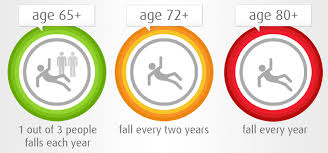
Ten technologies that can help with fall detection in 2019

The more things change…Who would have thought that fall detection would be added to a hearing aid?  Or that Apple would produce a watch with built-in fall detection, automatically activated for the 65+? A decade ago, before our very first Market Overview, Halo Monitoring launched a wearable fall detection chest strap, realizing the press-the-button PERS devices might not be enough to keep older adults safe – what if they weren’t wearing it?  That dilemma, of course, has helped drive some innovation in the medical alert industry, estimated at $3 billion annual revenue. In fact, MobileHelp, one of the first mobile PERS devices, acquired Halo Monitoring in 2012 – a good move for both, especially since by 2012, it was clear that fall detection by itself was not yet a market category hit.

So where are we today? Well, by itself, “fall detection” is not yet a market category hit. Often it is blurred as fall prevention – certainly a good idea in the face of the reported $50 billion cost of non-fatal falls annually. Falls have been correlated with other health issues, associated with hearing loss and depression. Wearing a fall detector does not prevent a fall, though if it catches a precursor fall, it can serve as an early warning signal of future, perhaps more dangerous falls, and prompt an intervention. But as a feature of something else, usually a PERS device,  in 2019, you can search and you can find multiple choices, more than in 2009. Here are ten example-only fall detection options in alphabetical order, material derived from the company websites or available media:   

AppleWatch. "If the Apple Watch Series 4 detects a hard fall while you're wearing your watch, it taps you on the wrist, sounds an alarm, and displays an alert. You can choose to contact emergency services or dismiss the alert by pressing the Digital Crown, tapping Close in the upper-left corner, or tapping "I'm OK." If your Apple Watch detects that you're moving, it waits for you to respond to the alert and won't automatically call emergency services. If your watch detects that you have been immobile for about a minute, it will make the call automatically. After the call ends, your watch sends a message to your emergency contacts with your location letting them know that your watch detected a hard fall and dialed emergency services." Learn more at Apple.

FallCall.  "FallCall Solutions announced today that FallCall Lite, the only personal emergency assistant for Apple Watch fully integrated into a national 24/7 emergency call center, now supports Apple’s new Siri Shortcuts. Users can record simple phrases like: “Assistance needed,” to contact trained emergency medical dispatchers and/or linked family and friends. “Time is of the essence when someone needs help,” states Shea Gregg, MD, a Trauma Surgeon and the President of FallCall Solutions. "Siri Shortcuts have simplified the ability to communicate and initiate commands on Apple devices. We have harnessed this revolutionary capability to contact family, friends and our 24/7 call center in an emergency. Additionally, FallCall will send location and heart rate information to aid in the response." Learn more at FallCall.

GreatCall Lively Mobile Plus. "The Lively Mobile Plus, like its predecessor, the Lively Mobile, has the fastest response time, as noted in published medical alert reviews. Its enhanced GPS technology, provided by Snapdragon Wear™ 1100 Platform, enables reliable and accurate locating in emergency situations. The device is equipped with fall detection technology, connecting to an agent when a fall occurs. Features also include the loudest amplified speaker yet for clear two-way communication, improved battery life - up to 80 hours - and a waterproof design so it can be worn in the shower." Learn more at GreatCall.

MobileHelp. "Our Fall Button provides extra protection by automatically sending an alarm if you fall and are unable to push your button. Our Fall Button is compatible with our Duo, Classic and Solo systems. Along with its Automatic Fall Detecting capabilities, it also has all of the features of our standard help buttons and allows you to send an alert to our US-based 24 x 7 x 365 Emergency Monitoring service by pressing the emergency button. The Fall Button will work approximately 350 feet from the Mobile Device and 600 feet from the Cellular Base Station of our Duo and Classic systems." Learn more at MobileHelp.

MyNotifi. "MyNotifi is a fall detection device that is worn on the wrist or belt and connects directly to the user's smart device. Since MyNotifi is worn on the wrist or on the belt line and is smart app driven, it can travel with you maintaining a continuous fall detection signal. In other words, the user is not relegated to the house as is the case if they are linked via a land line. Many or our aged population desire to live at home and MyNotifi allows them to do so, while keeping them in close contact with loved ones." Learn more at MyNotifi.

Philips Lifeline. "The GoSafe medical alert system is our most comprehensive system; it provides coverage and support wherever you go—whether that’s at home or to the supermarket. In addition to the GPS-enabled pendant, the in-home communicator provides an added layer of connectivity in your home. AutoAlert is designed to detect falls accurately and connect seniors to help in an instant, even if you can’t push the button." Learn more at Philips.

Starkey Livio AI. "A hearing aid feature, Livio AI benefits from the anatomy and physiology of the human body. During typical, daily activities and instances of falls, muscles in the neck work with the balance system of the inner ear to protect and stabilize the head. Since hearing aids are worn on the head, they are naturally less prone to mistake daily activities for falls than the devices worn on other parts of the body." Learn more at Starkey.

UnaliWear. "The Kanega watch is a self-contained watch and is not dependent on a connection to a home-based system or a smartphone, so you can get assistance at home or on the go in one simple, stylish watch. We combine cellular, Wi-Fi, GPS, BLE (for hearing aids and telemedicine devices), an accelerometer for automatic fall detection, and continuous speech to provide an active medical alert that works anywhere, along with data-driven artificial intelligence that learns the wearer’s lifestyle to provide predictive, pre-emptive support." Learn more at UnaliWear.

Vayyar Walabot Home.  "Vayyar Imaging, a company best known for its 3D sensor imaging technology, launched a new product called Walabot Home that can detect if a person has fallen and automatically call for help.  Walabot attaches to a wall in the user's home and is about the size of a small tablet. Users can put in their emergency contact list and if a fall is detected, the system automatically calls their contact." Learn more at Mobihealth News.

VitalTech Fall Alerts. "With VitalCare, through our innovative PERS wearables, a fall is detected or SOS panic alert is sent. The alert can be configured to phone numbers, emails, or to our medical alert call center. Connect VitalBand to our emergency medical response center for 24/7 safety coverage. Alerts are pushed directly to our call center for quick response. Seniors quickly get the help they need to prevent serious complications associated with falls." Learn more at VitalTech.



from Tips For Aging In Place https://www.ageinplacetech.com/blog/ten-technologies-can-help-fall-detection-2019

Thursday, April 18, 2019

Five Offerings from the 2019 What’s Next Boomer Business Summit

Today’s What’s Next Boomer Business Summit is recognized as key for entrepreneurs.  For the past 16 years, Mary Furlong and Associates have presented the What’s Next Boomer Business Summit – reflecting ideas and trends about what really is next for the older adult market segments, encompassing, according to AARP, a mind-boggling $7.6 trillion economy. These five companies presented at What’s Next this week in New Orleans today -- Loro was one of  the audience choice winners, along with Intuition Robotics.  Both will head to AARP’s grand pitch finale in the fall.  Information is from the websites of the companies:

LoroCo – smart companion robot for wheelchair users. “Loro has two components: Hardware with a universal mounting system that you can mount anywhere you want. Plus, our user friendly app that can be installed on your smart devices.  With a 360-degree rotating camera, Loro is designed inclusively to provide efficient communication, safe navigation, social interaction, and smart connectivity." Learn more at Loro.

Generation Exchange.  "The Generation Exchange holds workshops that connect students and older adults (ages 50 and up) to exchange knowledge and understanding about technology. Student volunteers are paired one-on-one with an older adult to answer basic questions about their phones, laptops, and tablets. Each connection begins a relationship that offers endless benefits including new knowledge, perspectives, and professional connections." Learn more at Generation Exchange.

AceAge. "Our upcoming product Karie is a personal health companion that organizes, schedules, and dispenses pills with one-button technology, ensuring that patients are taking the right medication at the right time. Karie is easy to use, enables greater patient autonomy and ensures better healthcare through a highly coordinated program. In addition to the release of Karie in 2018, AceAge has been working on various other upcoming initiatives, including i2P2 Studies and Applied Facial Recognition." Learn more at AceAge.

Montuno Software.  "Dosecast is a medication management app for Apple, Android, and Amazon devices that tracks and improves medication adherence. Dosecast empowers you to manage your diseases more effectively, improving your health and wellbeing. With Dosecast, you can track and adhere to the most complex medication regimen on your smartphone or tablet with just a few taps, wherever you are." Learn more at Montuno Software.

DreamPad. "It brings exclusively to your pillow—absolutely unheard by anyone else in your bed or your room—is soft, relaxing music, soothing ocean waves and other relaxing sounds of nature.  What makes the sound exclusive to you is bone conduction. If you’ve ever had your hearing tested, you will remember that the technician at some point places the amplifier on a bone just behind your ear, and all of a sudden you are hearing the sound not directly through the ear but through that bone. When you rest your head on the DreamPad, you will hear your soft music and your soothing sounds—but no one else will." Learn more at DreamPad.


from Tips For Aging In Place https://www.ageinplacetech.com/blog/five-offerings-2019-what-s-next-boomer-business-summit